

Your IMT Computers Certificate: Verify It and Add It to LinkedIn
Every certificate IMT Computers issues for a web development course, for a SIWES placement and for the SEO training course, carries a QR code and a Certificate ID, so anyone can check that it is genuine in a few seconds. After your training, we guide you through setting up your LinkedIn profile and adding the certificate to it.
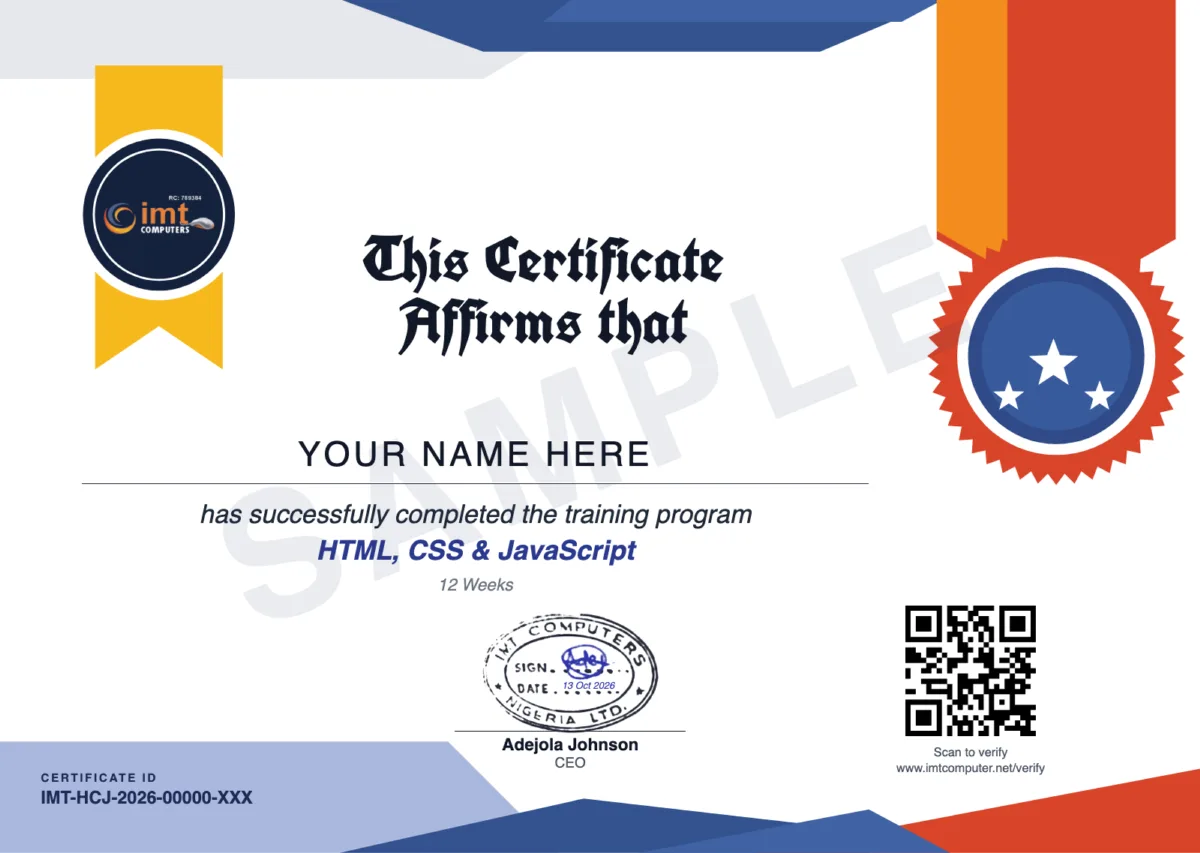
What is on your certificate
Your name, the title and length of the course you completed, the issue date, IMT Computers' official stamp and signature, and the Certificate ID printed beside a QR code. A fake or altered certificate fails the check, because the ID is looked up in IMT Computers' own records.
Send it as a link
Each certificate also has a web link of its own, so you can send it to an employer or client instead of attaching a file. The link opens your certificate and its verification. Once you have agreed to show your name, the page also has a Download certificate (PDF) button, so whoever you send it to can keep a copy. A certificate does not expire. It stays valid unless IMT Computers revokes it.
How anyone can verify it
- Scan the QR code with a phone camera. It opens the verification page of that one certificate.
- Or enter the Certificate ID on the Verify a Certificate page.
- The result is valid, revoked or not found. Certificates do not expire.
Employers and institutions do not need an account or any contact with IMT Computers to do this.
How the LinkedIn guidance works
When the training ends, your lecturer works with you on LinkedIn. It does not matter if you have never used it.
- Your profile. If you do not have a LinkedIn account, you create one together. Your lecturer helps you set up the profile so it shows what you can do.
- Your certificate. In the student portal, open your certificate and choose how it is shared. Agreeing to show your name on the certificate page switches on the sharing buttons.
- Add to LinkedIn. Press Add to LinkedIn. LinkedIn's "Add license or certification" form opens with the course title, the issue month and year, the Certificate ID and the link to your verification page already filled in. If LinkedIn opens a blank form, the portal shows the same details with copy buttons.
- Proof on your profile. The entry on your profile links to your verification page, so a recruiter can confirm it without asking you.
What the certificate is, and what it is not
It is IMT Computers' certificate of completion for the course you took. It proves you finished that training at IMT Computers. It is not a degree, a professional licence or an FOA certification. Pair it with what you built: the projects from your course are what show an employer or a client that you can do the work. See the projects our web development students build.
Courses that end with this certificate
-
PHP & SQL
Beginner · 12 Weeks
-
HTML, CSS, JavaScript, PHP & SQL
Beginner · 24 Weeks
-
HTML, CSS & JavaScript
Beginner · 12 Weeks
-
Website Design
Beginner · 12 Weeks
-
Laravel Development
Intermediate · 12 Weeks
-
React.js, Laravel & SQL
Intermediate · 16 Weeks
-
React.js & Tailwind CSS
Intermediate · 12 Weeks
-
PHP, Laravel & SQL
Intermediate · 16 Weeks
-
React.js & Laravel Development
Intermediate · 16 Weeks
-
Complete Full Stack Bootcamp
Beginner to Advanced · 24 Weeks
-
SEO, GEO, AEO & AI Training
Beginner to Intermediate · 12 Weeks
Questions
- How can an employer check my IMT Computers certificate?
- They scan the QR code on the certificate, which opens its verification page, or they enter the Certificate ID on the Verify a Certificate page of this website. The result says whether IMT Computers issued the certificate and whether it is valid, revoked or not found.
- Who helps me put my certificate on LinkedIn?
- Your lecturer. After the training, your lecturer guides you through setting up your LinkedIn profile and adding the certificate to it. SIWES students get the same help from the IMT team at the end of the placement.
- What if I do not have a LinkedIn account yet?
- That is fine. Creating the account is part of the guidance: your lecturer helps you create it and set up your profile before adding the certificate.
- Will my name show when someone verifies my certificate?
- Only if you choose to show it. When you open your certificate in the student portal you decide how it is shared. If you do not agree to show your name, the verification page still confirms the course and the issue month, without naming you.
- Does the certificate expire?
- No. An IMT Computers certificate does not expire. It stays valid unless IMT Computers revokes it.
- Is this the same as an FOA certification?
- No. This is the IMT Computers certificate of completion for IMT's own courses. FOA certifications such as CFOT are issued by the Fiber Optic Association and are verified with the FOA.
Ready to start? Compare the web development courses in Lagos, see the SIWES placement in Lagos for computer science and IT students, learn SEO, GEO and AEO in Lagos, or contact IMT Computers with a question.